
Search across everything
Find a decision, file, message, or detail from the fragments you remember.
Describe what you're looking for, even when you cannot remember the exact words or which conversation it was in. Perisclaw searches the sources it is allowed to use and shows you where the answer came from.
Find the message where we agreed the launch date. Tell me the decision, who agreed to it, and show me the source.
Ask, check, refine
- 1
Describe the memory
Include anything you remember: a person, rough date, topic, amount, group, or file type. You do not need the original wording.
Perisclaw understands what you are looking for.
- 2
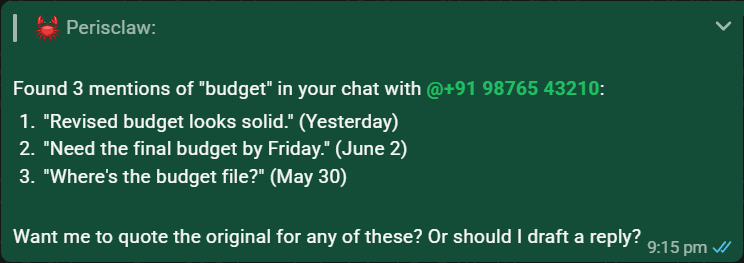
Review the source context
Check the quoted message, date, and conversation before acting on an important result. Ask for the surrounding messages when the decision is ambiguous.
You can see who said it and the context around it. - 3
Narrow the answer
Add one more clue if the first result is broad: “only the client group”, “after the June meeting”, or “the PDF, not the spreadsheet.”
The result points to the specific detail you needed.
Where Perisclaw can look
- Allowed WhatsApp conversations, including relevant text and shared media.
- Email, calendar, and files when the matching apps are connected.
- Saved entries in your personal wiki and relevant relationship context.
- The live web, when you ask for current information.
Search beyond a message
Perisclaw can look inside a voice note, image, document, or link when you point it at one. Ask for a transcript, the numbers in an invoice, or a short summary of a page.
Ask about current informationUse live web research when your own sources are not enough
Try:
“Open this link, tell me the main claim, and check whether the information is still current.”
See Web research.
Ask how Perisclaw worksSearch the current product documentation
Try: “How do I stop you replying in a group?” Perisclaw can use the current docs and point you to the relevant guide.