
Organize your WhatsApp
How to label, mute, archive, summarize, and run your groups by asking.
Ask for the result you want: fewer unread badges, quieter groups, a small set of useful labels, or old chats out of the way. For a bulk change, Perisclaw shows you exactly what it will touch before it acts.
Review a cleanup before it runs
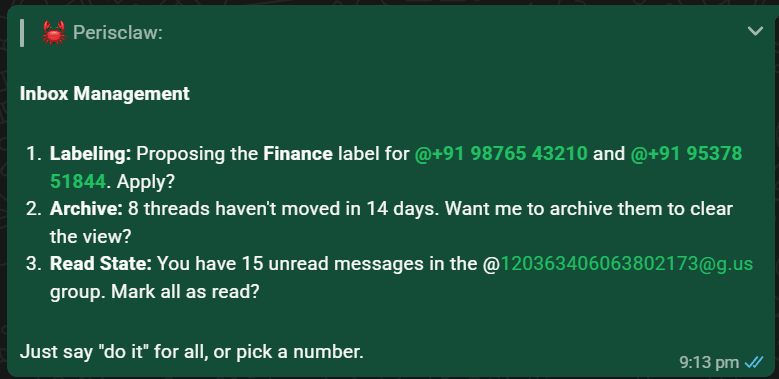
- 1
Describe the result
Say what should be easier afterward: “quiet the building groups for a week” or “propose useful labels for my client chats.”
Perisclaw understands the rule and the kind of chats it applies to.
- 2
Check the exact scope
For a broad request, review the named chats, proposed labels, and item counts. Narrow or correct the list before approving it.
You know exactly which chats will change. - 3
Approve and verify
Confirm the listed change. Perisclaw applies it in WhatsApp and reports what succeeded or failed.
Your WhatsApp chat list reflects the approved result.
Review my client chats and propose a small set of useful labels. Show me every chat under each label before you apply anything.
Choose an inbox action
- Summarize a busy chat or a named set of conversations. Summaries work across a label too, so “catch me up on work” is a single request.
- Label chats and individual messages by project, relationship, or priority after reviewing the proposed names and membership. Once labeled, you can act on the whole set at once: “let all my work chats know I’m OOO today.”
- Mute, pin, or archive one chat or a clearly defined set.
- Mark read or unread when you want to clear badges or bring something back to the top.
Run your groups
Perisclaw also handles the fiddly admin work of running WhatsApp groups. Ask in plain language:
- Create a group: “create a group called ‘Q3 Launch’ with Priya, Raj, and Meena.”
- Add or remove people: “add Sam to the Vendors group.” If WhatsApp won't let Perisclaw add someone directly, they get an invite to join instead.
- Promote or demote admins: “make Priya an admin of the launch group.”
- Share an invite link: “get the invite link for the Clients group.”
- Change group settings: for example, who may send messages or edit the group info.
- Leave a group: “leave the old project group.”
Put a question to a vote
Ask Perisclaw to poll a group and it posts a real WhatsApp poll, the native kind with tap-to-vote options. It reads the results back as they come in, including who voted for what, so you can chase the people who have not.
Poll the team group: Thursday 4pm or Friday 11am for the review call?
Useful cleanup requests
Catch up without changing anythingRead-only summary
Try:
“Summarize the last 200 messages in the launch group. Separate decisions, open questions, and anything waiting on me.”
Quiet a category temporarilyMute a named set of chats
Try:
“Mute my building society groups for one week. Show me the group names before you do it.”
Archive stale conversationsMove inactive chats out of the main list
Try:
“Propose chats to archive that have had no activity for three months. Do not delete anything.”