Drive & Sheets
Google Drive filing and Sheets updates from any WhatsApp chat.
Connect Google Drive and Sheets, and Perisclaw becomes the way you file documents and log data, straight from your chats. Anything that arrives or gets decided in WhatsApp can go where it belongs without you downloading it, opening another app, or hunting for the right folder or cell.
Connecting your Drive and Sheets
Just ask in your self-chat, and Perisclaw walks you through a one-time Google sign-in.
If you've already connected your Google Calendar, you're set. The same Google sign-in covers Drive and Sheets, so there's nothing separate to authorize.
What you can do with it
Save files to Drive instantly
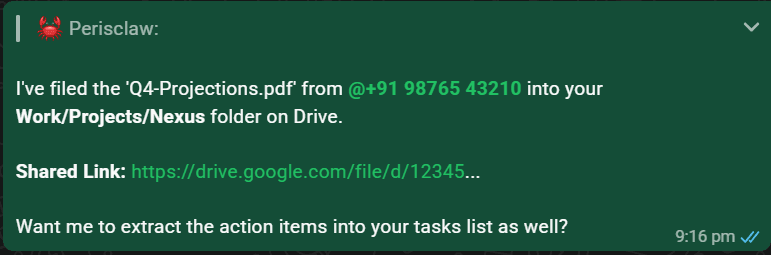
Documents you get on WhatsApp (contracts, invoices, receipts, briefs) otherwise sit buried in chat history. Forward one to Perisclaw, or point it at a chat, and it files the document straight into the right Drive folder with a single instruction.
Keep Drive organized
Perisclaw handles the filing system, not just the file. It can create folders on the fly, move documents between them, and rename files to a consistent convention, like 2026-06-Vendor.pdf, so they're actually findable later instead of saved as IMG-202401.pdf.
Log data into a Sheet
Numbers shared in chat (an expense, a lead, an order) usually never make it into a spreadsheet, because opening one to log a single line isn't worth it. Send Perisclaw the detail or the receipt and it reads what matters (date, vendor, amount) and appends it as a row. It can create a new sheet if you don't have one yet.
Query your Sheets
Once data is in a sheet, you can ask about it without opening it. Perisclaw reads the sheet and answers right in the chat, so a total or a count is one message away wherever you are.

Update records
Trackers go stale when updating them is a chore. Perisclaw can change a value, mark a status, or update a specific row on your instruction, so your records stay current from the chat.
Manage the tabs, not just the cells
A tracker usually outgrows one tab. Perisclaw can add a new sheet for the new month, rename one, or clear a range that's gone stale, so the structure keeps up with the data. It can also format cells, such as a bold header row or highlighted overdue rows, without changing the values.
Work across several accounts
You can connect more than one Google account (your work one and your personal one) and tell Perisclaw which to use. Say "connect my work Google too," and from then on "save this to my work Drive" goes to the right place.
Good to know
With Drive & Sheets connected, your important documents are never lost to the noise of chat history. They're filed into a structured, searchable archive as you go.