Calendar
Connect a calendar, check availability, and book or move events from WhatsApp.
Connect Google Calendar once, then ask Perisclaw to check your day, protect focus time, or arrange a meeting without leaving WhatsApp.
Connect and book your first event
- 1
Connect Google Calendar
In self-chat, ask “connect my calendar.” Open the secure link and approve the Google access you want to grant.
Perisclaw confirms the connected Google account. - 2
Check before you book
Ask for a day or a time window. If you use more than one calendar, name the accounts that should be checked.
The answer shows the relevant events or available windows.
- 3
Create the event with complete details
Include the day, time, duration, timezone, and attendee. Perisclaw asks only when something is missing, like an attendee's email.
Perisclaw confirms what was booked and who was invited. - 4
Open the saved event
Use the Open in Calendar button in the confirmation to verify the time, invitees, and meeting location.
The event appears on the intended calendar.
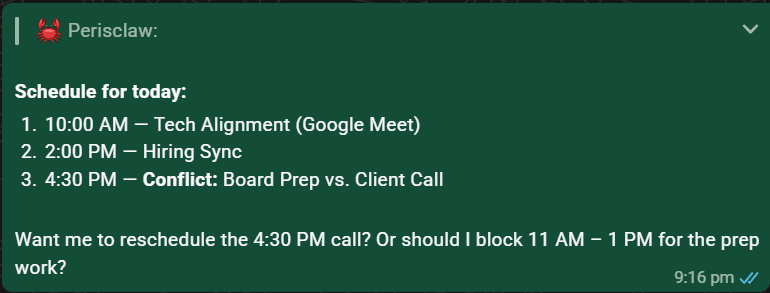
What is on my calendar tomorrow, where do I have a free 90-minute block, and are there any conflicts?
Use it during the day
- Ask for a briefing before a meeting using allowed chat and connected-app context.
- Block focus time for a task or commitment.
- Move a personal hold, or ask to edit an event with attendees.
- Hand over the whole back-and-forth: ask Perisclaw to coordinate a meeting and it runs the exchange as a Mission until the time is booked.
Brief me for my 3pm. What is the meeting for, what did we last discuss, and what should I decide?
Calendar details
Use more than one Google accountCheck conflicts across work and personal calendars
Connect each Google account, then name the account to use when you book. If the target calendar is ambiguous, Perisclaw asks before writing.
Invites update your tasksA meeting joins the work it belongs to
When a new or changed invite arrives on your primary Google Calendar, Perisclaw matches it to your open tasks with the same people. The invite can give a task its date, or close a task that was only to set up the meeting. A cancelled meeting updates the task too. An invite on its own never becomes a task asking you to attend.
Book from another WhatsApp chatPrivate calendar details stay in self-chat
A request can start with /claw in another chat, but the
private details move to your self-chat. Perisclaw never tells the other
person why a time is unavailable.
Understand invites and Meet linksAttendees are notified when the event is created
Perisclaw verifies a required attendee email before creating the event. A location-free meeting normally receives a Google Meet link; an in-person meeting does not unless you ask for a hybrid meeting.
Disconnect the calendarRevoke access at any time
Ask Perisclaw to “disconnect Google”, or remove Perisclaw from third-party app access in your Google Account security settings. Connect Microsoft 365 from Apps in the web app for Outlook calendar access.